
Free DVLA Vehicle Check by Registration
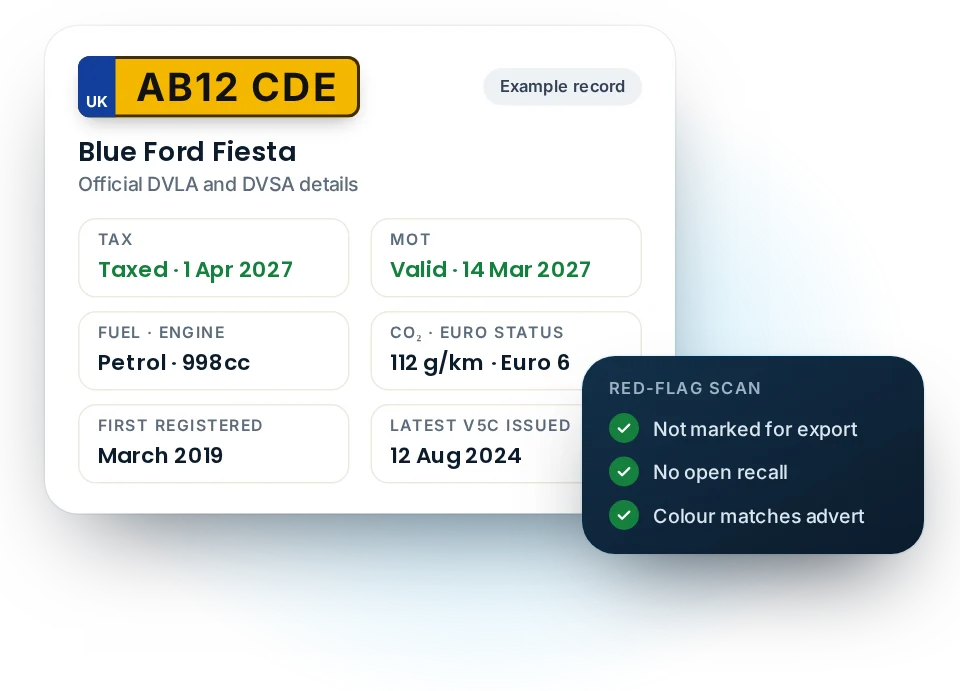
Run a free DVLA vehicle check on any car, van or motorbike registered in the UK. Enter the number plate and, in a few seconds, you'll see its tax and SORN status, MOT expiry, colour, engine size, fuel, CO₂ figure and Euro status. Everything comes from the official DVLA and DVSA records.
- Official DVLA and DVSA records
- Free, with no sign-up
- Every field explained
Updated · By Hamza Akram · Where our data comes from
What a DVLA vehicle check shows
The DVLA holds the official register of every vehicle on UK roads. A vehicle check by registration reads the public part of that record, so you see what the agency itself holds, not a dealer's description or a seller's memory.
Our report then adds the MOT record from the DVSA. As a result, one search answers the three questions most people have: is it legal, is it what the seller says, and is anything unusual about it?
Tax and SORN status
Whether the vehicle is taxed, untaxed or declared off the road, and the date the next payment falls due.
MOT status
Whether the MOT is valid and when it runs out, plus the full test history from DVSA.
Make, model and colour
The details registered with DVLA. Handy for spotting a respray or a cloned plate.
Engine and fuel
Engine size in cc and the fuel type, so you can check them against the advert.
Emissions
The CO₂ figure, Euro status and, for newer diesels, real driving emissions (RDE).
Registration and logbook
First registration date, vehicle age and the date the latest V5C logbook was issued.
Every field in a DVLA vehicle check, explained
Most free checks list the data and leave you to guess what it means. This table explains each field, and why it matters if you're buying.
Legal status in a DVLA vehicle check: tax and MOT
| Field | What it tells you | Why it matters when buying |
|---|---|---|
| Tax status | Taxed, Untaxed or SORN | Untaxed or SORN means the car can't legally be driven away until you tax it |
| Tax due date | When the current tax runs out | Tax doesn't transfer to a new keeper, so you'll need to tax it yourself |
| MOT status and expiry | Whether a valid MOT is on record | A car without a valid MOT can only be driven to a booked test or for repairs |
Identity, history and emissions
| Field | What it tells you | Why it matters when buying |
|---|---|---|
| Colour | The colour registered with DVLA | A different colour on the car can mean an unreported respray, or a cloned plate |
| Engine size and fuel | Engine capacity in cc and fuel type | Should match the advert and the V5C. A mismatch needs a clear explanation |
| Year of manufacture and first registration | When it was built, and first registered | A long gap between the two can point to an import or a car stored before sale |
| Last V5C issued | When the latest logbook was produced | A very recent date often follows a keeper change. Ask how long the seller has owned it |
| CO₂ and Euro status | Exhaust emissions figures | They help set the tax and decide whether clean air zones charge the car |
| Marked for export | Whether a keeper told DVLA it's going abroad | A car marked for export shouldn't be on sale in the UK. Treat it with caution |
| Expensive car supplement | When the extra yearly tax ends, if it applies | It adds to the yearly road tax for the first few years, so budget for it |
You'll also see the type approval category, the wheelplan and the revenue weight. They matter mostly for vans and commercial vehicles.
How to check vehicle details by registration
You don't need the V5C logbook, an account or a card. The number plate is enough.
- Enter the registration Type it with or without the space. Personalised and older plates work too.
- Read the two status cards Tax and MOT sit at the top in green, amber or red, so you can see at a glance whether it's road-legal.
- Compare the details Check the make, colour, engine and fuel against the car in front of you and the advert.
- Open the MOT history Scroll down for every test, failure, advisory and mileage reading since 2005.
Once you've checked a vehicle, you can print the report, save it as a PDF or share a link with someone else. Many buyers run two or three checks to compare cars side by side.
Our vehicle check compared with GOV.UK's vehicle enquiry
The government runs its own free vehicle enquiry service on GOV.UK, and it's an excellent official source. However, it shows one record at a time, as plain text, and it doesn't include the MOT history. That's the gap we fill.
| What you get | GOV.UK vehicle enquiry | MOT Check Online |
|---|---|---|
| Tax status, due date and SORN | Yes | Included, with a countdown |
| Make, colour, engine, CO₂ and Euro status | Shown | Shown, with explanations |
| MOT expiry date | Included | Included |
| Full MOT history with defects and advisories | No, it's a separate service | Yes, colour-coded |
| Mileage at every MOT, with drops flagged | No | Yes, charted |
| Outstanding safety recall | No | Yes, where DVSA holds it |
| Faults that keep coming back | No | Yes, flagged automatically |
| Cost | Free | Free |
If you ever need the official word, for example in a dispute, use GOV.UK. For everyday checks before you buy, our report puts everything on one page.
Red flags to look for in a DVLA vehicle check
The data only helps if you know what to look for. These are the warning signs worth acting on before you hand over any money:
- The registered colour doesn't match the car. Ask about a respray, and check the V5C shows the change.
- The engine size or fuel type differs from the advert. It may be a simple mistake, or a different car.
- The car is untaxed or on a SORN, yet the seller drives it to meet you.
- The MOT has expired. Agree any sale subject to a new MOT pass.
- The V5C was issued in the last few weeks. Ask why, and how long the seller has had the car.
- The vehicle is marked for export. Don't buy until the seller explains why it's still in the UK.
- There's an outstanding safety recall. Contact a franchised dealer, who'll usually fix it free of charge.
Any one of these can have an innocent explanation. Even so, a good seller will be able to explain it, and show paperwork to back it up.
What a free vehicle check can't tell you
A free DVLA vehicle check covers the official public record. It doesn't include information held by private companies and the police, because those records aren't public.
Not covered by any free check
Outstanding finance, insurance write-offs, stolen markers and the number of previous keepers come from finance companies, insurers' registers and the Police National Computer. Paid history checks buy access to those sources, which is why they cost a few pounds.
Equally, no website can show you the owner's name or address. The DVLA only releases keeper details to people with a "reasonable cause", such as tracing an abandoned vehicle, using form V888. Be wary of any site that claims otherwise.
Our data sources page explains exactly where every field comes from and how fresh it is.
DVLA, DVSA and "VOSA": who does what
Three names cause most of the confusion. The DVLA, in Swansea, keeps the vehicle register and collects tax. The DVSA runs the MOT scheme and keeps every test result. VOSA, the old testing agency, merged with the Driving Standards Agency in 2014 to form the DVSA. So a "VOSA vehicle enquiry" today means a DVSA MOT check.
If you're mainly after the MOT, our DVLA MOT check explains MOT status in detail. To dig into past tests, go straight to the MOT history check.
DVLA vehicle check: frequently asked questions
Is a DVLA vehicle check free?
Yes. Checking a vehicle's tax, MOT and basic details is free, both on GOV.UK and on MOT Check Online. You only pay for history checks that cover finance, write-offs and theft.
Can I find out who owns a vehicle from its registration?
No. Keeper names and addresses aren't public. The DVLA only releases them to people with a reasonable cause, such as after an incident involving the vehicle, through form V888.
How do I check if a vehicle is taxed?
Enter the registration in the check above. The tax card shows whether it's taxed, untaxed or SORN, and when the tax runs out. Our car tax check explains each status in more detail.
Does a vehicle check work for motorbikes and vans?
Yes. It works for any vehicle registered with the DVLA, including motorcycles, vans and motorhomes. MOT records also cover lorries, buses and trailers tested in Great Britain since 2018.
Why does the colour in my check differ from the car?
Usually because the car was resprayed or wrapped, and nobody told the DVLA. Keepers should report a colour change, so ask the seller and check the V5C.
How up to date is a DVLA vehicle check?
Our report fetches the DVLA and DVSA records live, then keeps them for up to six hours. GOV.UK notes that MOT information can take up to two days to update after a test.
Is MOT Check Online the official DVLA website?
No. We're an independent site that uses official DVLA and DVSA data, and we aren't connected to either agency. GOV.UK runs the official services.
Run your free DVLA vehicle check
Check the tax, MOT and official details of any UK vehicle in seconds. A free DVLA vehicle check takes one registration and no sign-up.